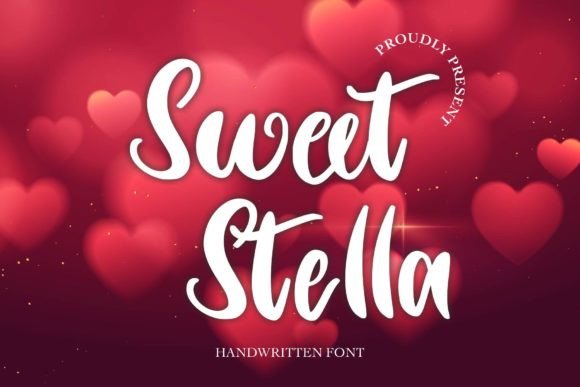
Sweet Stella: A Maker's Guide to Using This Elegant Display Font
Designing Candle Labels with Sweet Stella
While preparing a new line of soy candles for my small shop, I reached for Sweet Stella to elevate the label design. I wanted something soft, romantic, and timeless—perfect for a lavender-scented candle meant to soothe and inspire. As soon as I typed “Lavender Fields” in Sweet Stella, the transformation was instant. The font’s flowing curves and delicate serifs gave the label a handmade elegance that matched the candle’s purpose.
What Makes Sweet Stella Special
Sweet Stella is a display font that blends classic charm with modern readability. Its thoughtful design balances decorative elements with legibility, making it ideal for short text like product names, titles, and phrases. The font carries a warm, inviting mood—great for creators looking to add a touch of sophistication without overwhelming a design. Whether it’s printed on a boutique tag or used in digital shop banners, Sweet Stella brings a softness that feels both luxurious and accessible.
Perfect for Handmade Product Labels
When designing candle labels, I always test fonts at different sizes to ensure they remain readable once printed. Sweet Stella holds up beautifully even at smaller sizes, especially when paired with a clean sans serif for supporting text like scent descriptions or ingredients. The contrast between the elegant Sweet Stella title and a minimalist sans serif like Montserrat or Lato creates a balanced, professional look.
Wedding Invitations and Stationery
For a recent custom wedding invitation set, I used Sweet Stella on the bride and groom’s names, the event date, and the venue. The font’s romantic curves complemented the floral motifs and soft color palette. It worked especially well in a layered design where the names were in gold foil and the rest of the text was printed in a muted sage. Sweet Stella’s character sets allowed me to choose alternate letters and ligatures that added a personal, calligraphic feel to the names.
Printable Wall Art and Planner Pages
In my digital shop, I offer printable wall art and planner inserts for seasonal themes. Sweet Stella became my go-to font for titles like “March Mood Board” or “April Affirmations.” It brings a soft, editorial quality to the designs. For wall art prints, I pair Sweet Stella with a simple serif or handwritten font to keep the layout from feeling too busy. For planner pages, I use it sparingly for headers or motivational quotes, ensuring it doesn’t interfere with the functional areas of the page.
Stickers and Digital Downloads
Testing Sweet Stella in sticker designs was a must, especially for boutique tags and seasonal gift tags. The font’s clean outlines and open spacing make it compatible with cutting machines like Cricut and Silhouette. When creating a holiday sticker sheet, I used Sweet Stella for phrases like “Joy to the World” and “Merry & Bright.” The font scaled well and cut cleanly, even in smaller sizes. For digital downloads, I previewed the font in listing images to show how it looked both close-up and in a mockup layout.
Shop Branding and Packaging Design
Using Sweet Stella for packaging design helped unify my brand across physical and digital spaces. I added the font to custom tissue paper, thank-you cards, and product tags. It gave my packaging a boutique feel that customers noticed and appreciated. On digital product previews, I made sure to use Sweet Stella consistently in titles and headers to reinforce brand recognition. The font’s multilingual support also allowed me to create templates for international customers without any character issues.
Font Pairing Tips
- Pair Sweet Stella with a clean sans serif for modern contrast.
- Combine it with a handwritten font for a more organic, personal touch.
- Use a bold script font as a secondary typeface for editorial-style headers.
- Match it with a simple serif font for classic stationery layouts.
Readability and Practical Use
Sweet Stella shines best in display settings—titles, names, and short phrases. While it’s not ideal for long paragraphs, its decorative appeal makes it perfect for product names, greeting card messages, boutique tags, and social media graphics. When using it for physical products, I always test print a sample to ensure the fine details remain visible. For digital mockups, I preview the font at different zoom levels to make sure it looks good on both desktop and mobile views.
Font Features to Check
Before using Sweet Stella in commercial products, I reviewed the font files to ensure they included all necessary styles, alternates, ligatures, and swashes. I also checked for multilingual support and commercial licensing terms. Knowing that the font was licensed for commercial use gave me peace of mind when creating printables, SVG designs, and physical merchandise for my shop.
Creative Ideas for Seasonal and Holiday Products
During the holiday season, I used Sweet Stella for gift tags, ornament labels, and digital greeting cards. The font’s softness made it perfect for phrases like “Season’s Greetings” and “Peace & Joy.” I also created a farmhouse-style sign for a client using Sweet Stella paired with a rustic wood texture. For spring, I designed a set of floral wall art prints with the font, and for summer, I used it on boutique tote bags with a minimalist layout.